 AI-agent & LLM workbench
Agentlab
Test an AI agent before release: permissions, traces, costs, citations and output checks.
Agentlab turns twelve usefulweb.site AI tools into one workbench for an AI agent or LLM feature. Collect its MCP configuration, tool definitions, transcripts, structured-output samples, eval results, RAG answers, cost scenarios, model requirements, websites and routing test sets in a project, run them all, and get one dashboard of findings, release gates that pass or fail, cross-checks between the tools, run history, scenario comparisons and a printable report. Secrets in configurations are redacted in your browser before anything is sent.
Screenshots
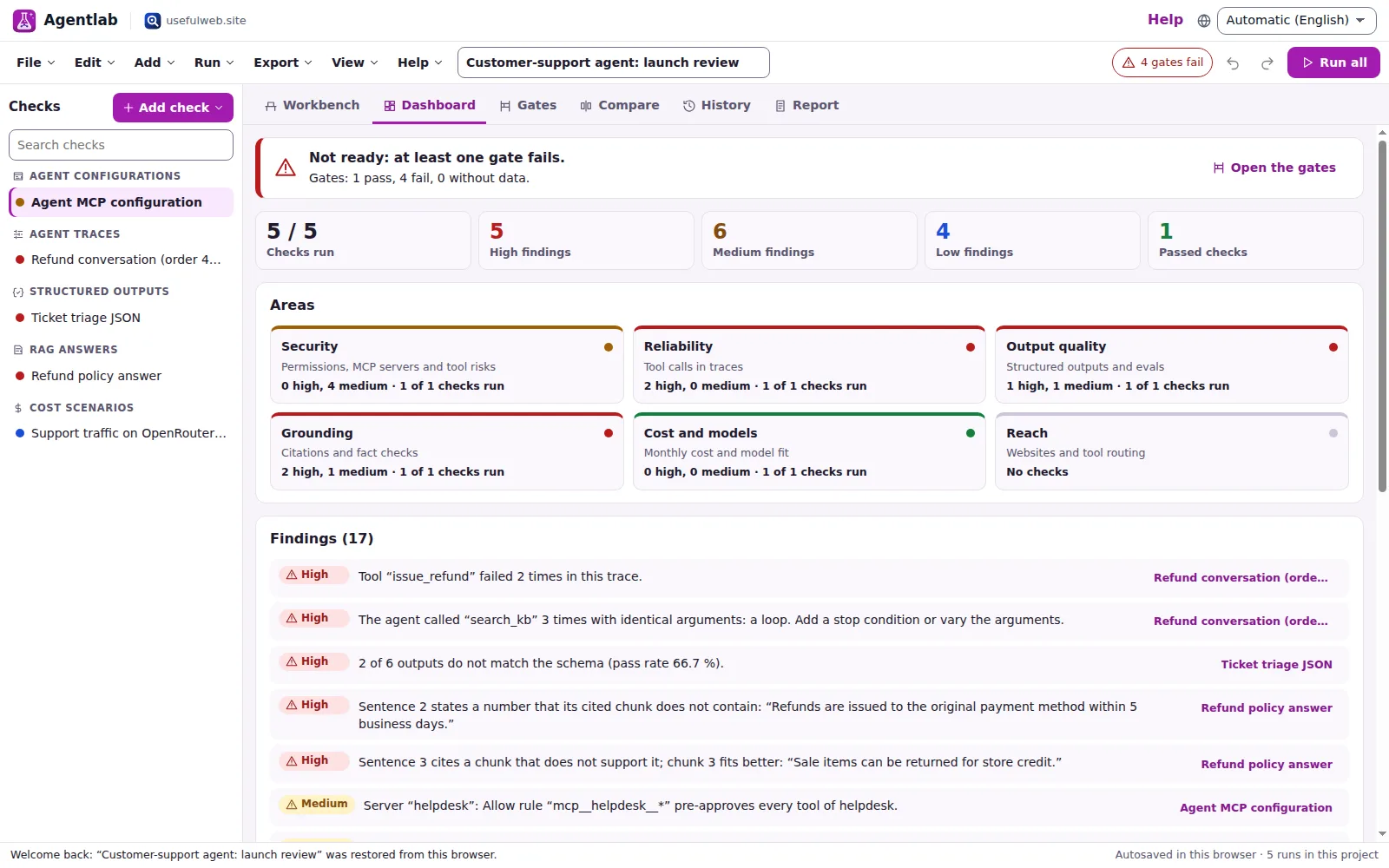
- Dashboard: release verdict, areas and findings
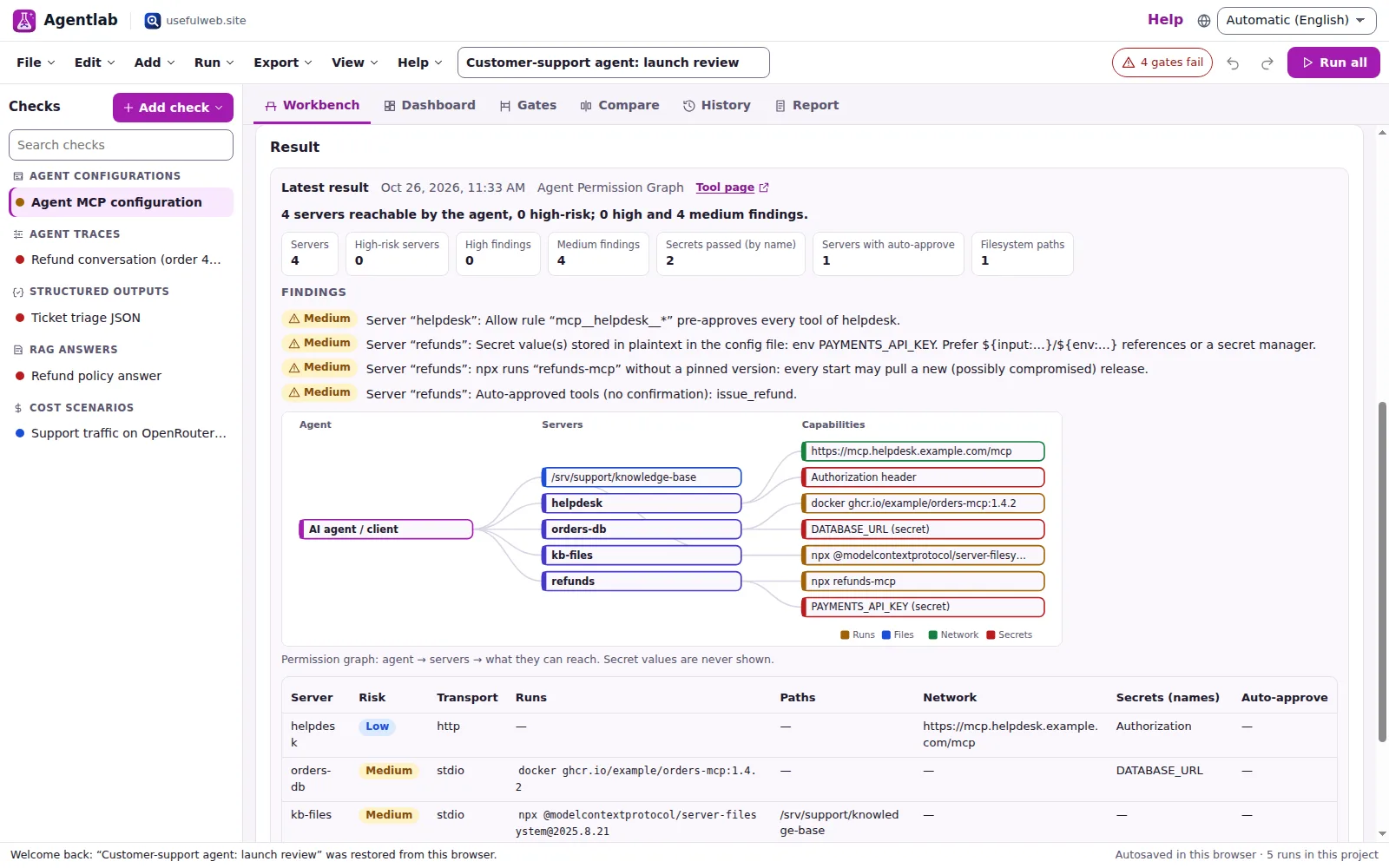 Permission graph of an agent configuration
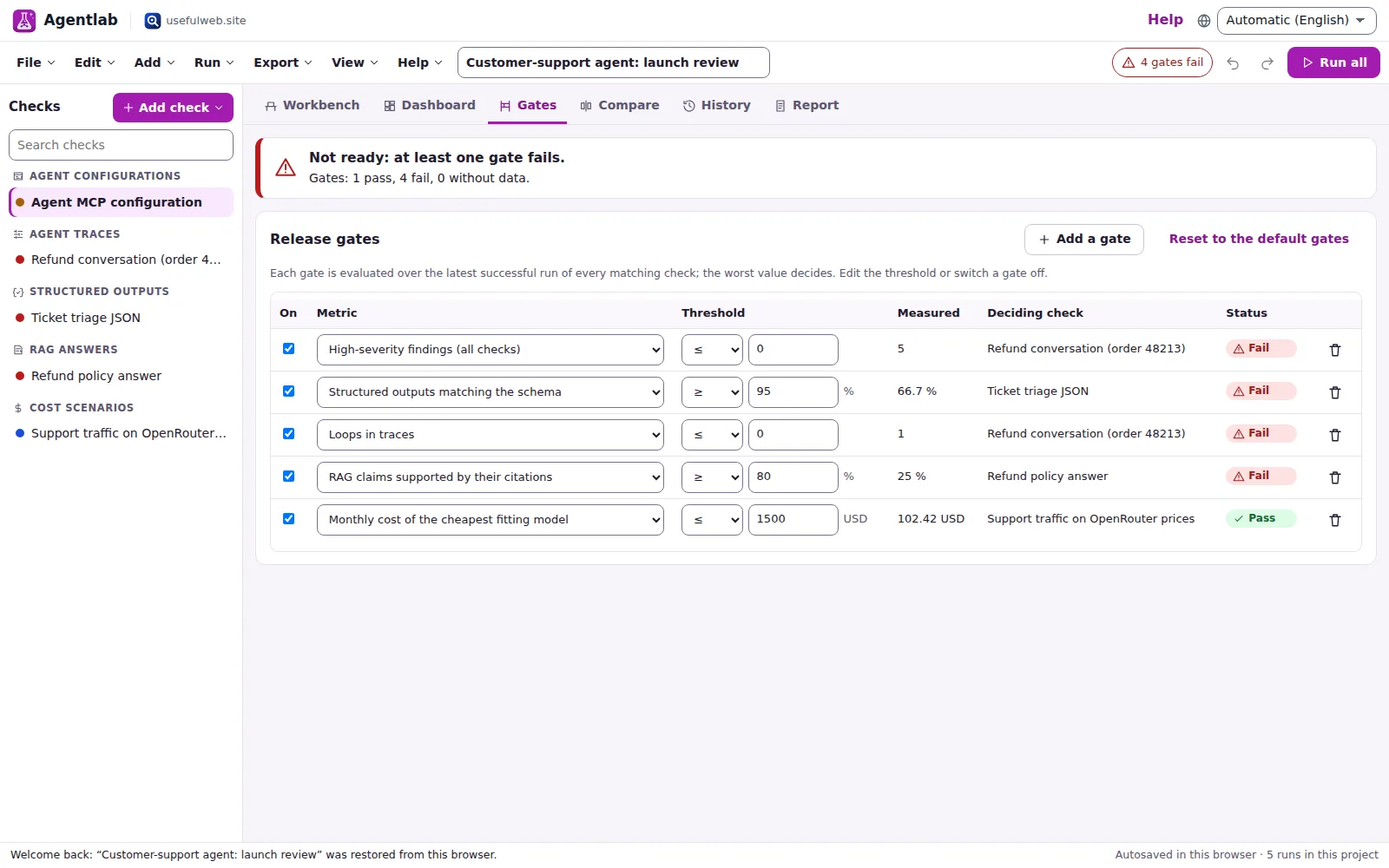 Release gates with the deciding check
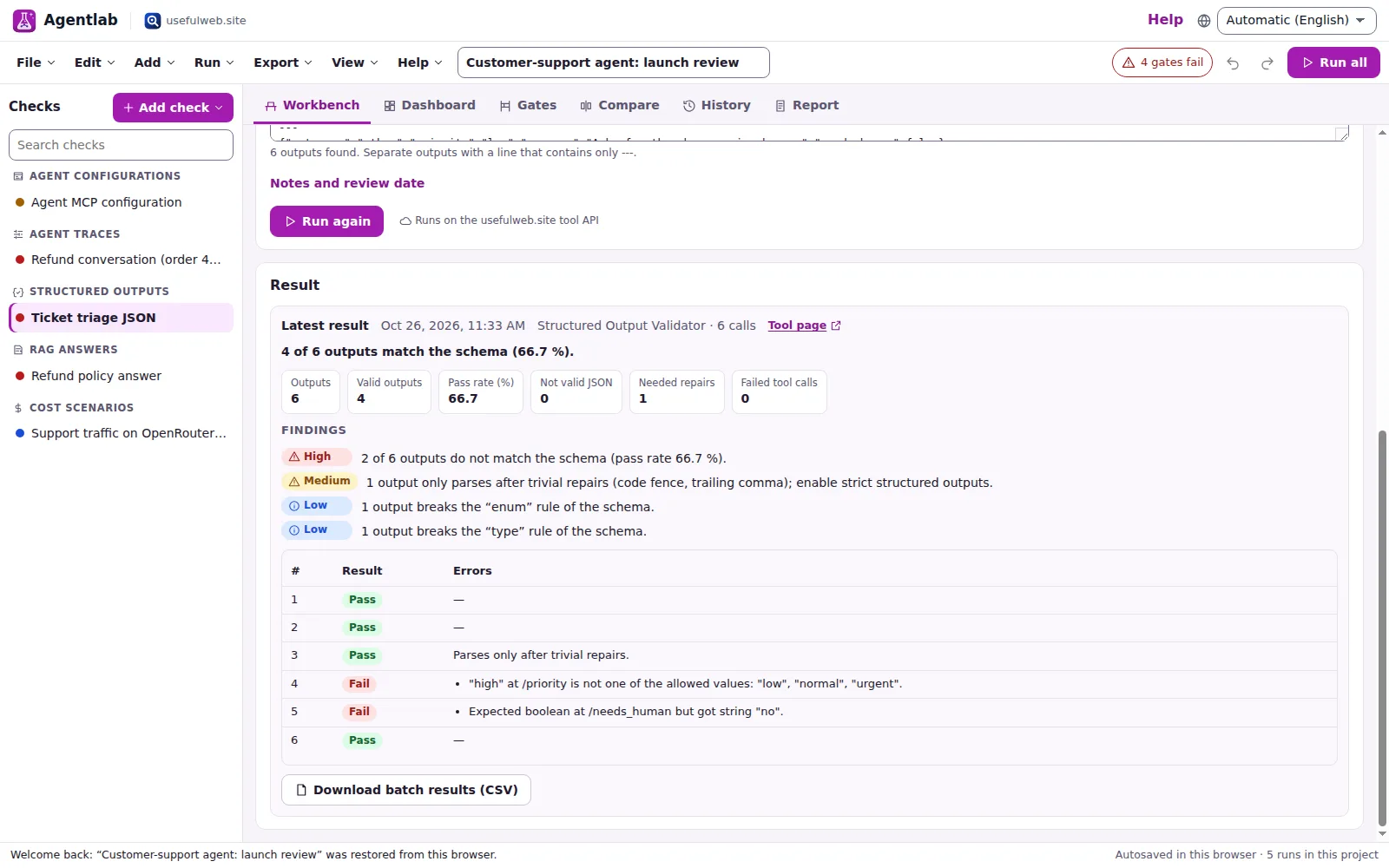 Batch validation of structured outputs
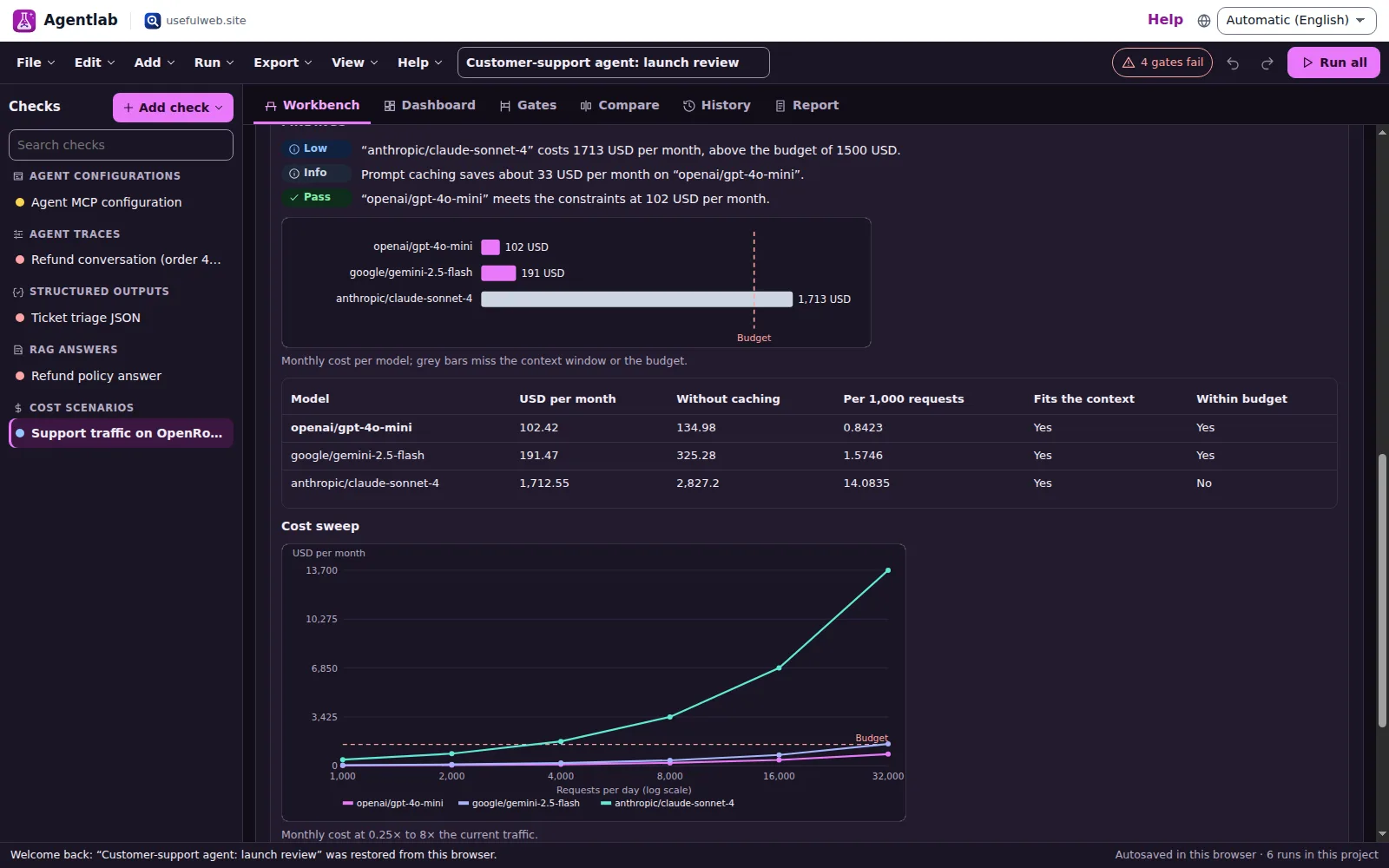 Cost sweep in the dark theme
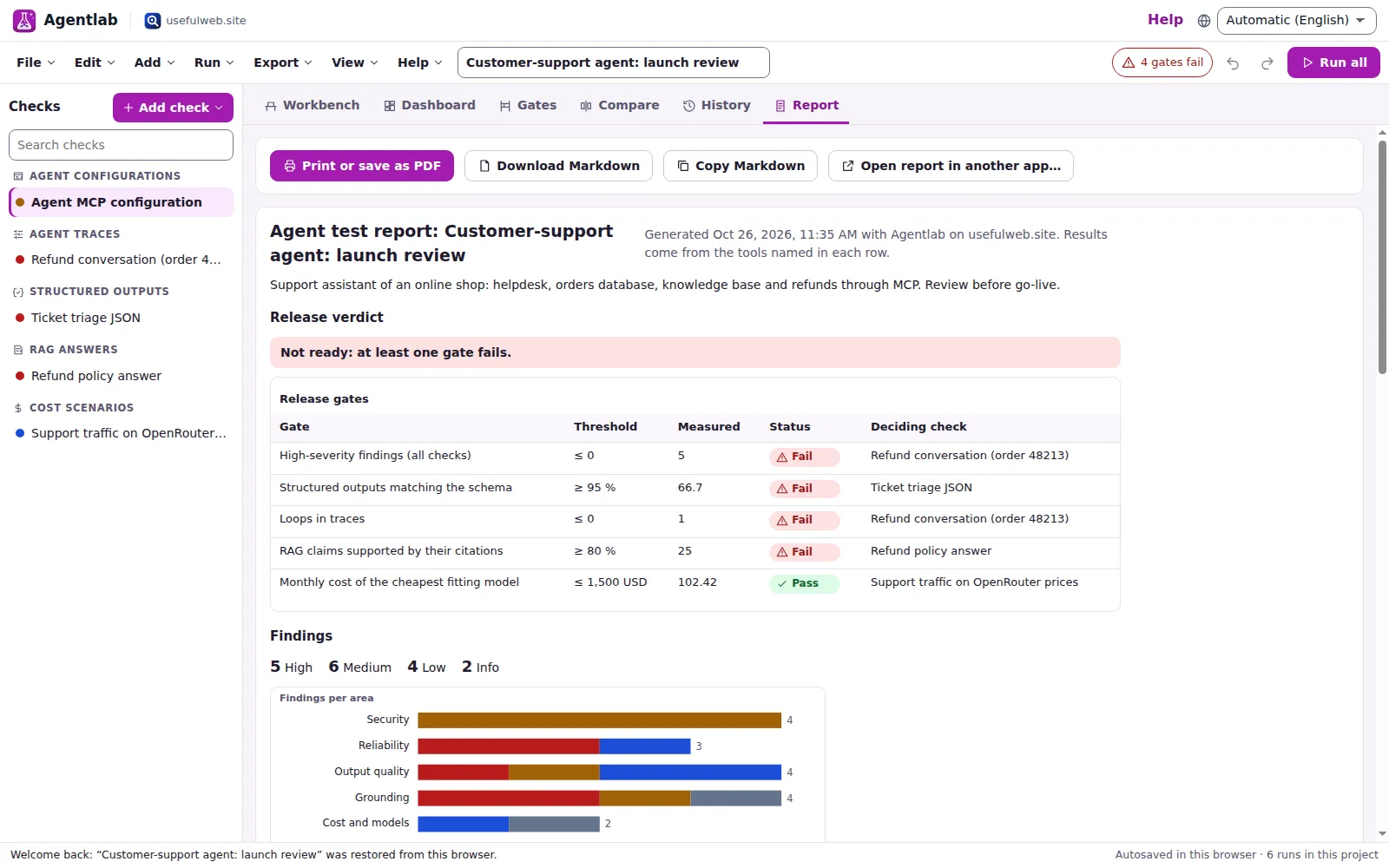 Consolidated report, ready to print
Features
One project per agent
Agent configuration, MCP servers, tool definitions, traces, structured-output samples, evals, RAG answers, fact checks, cost scenarios, model requirements, websites and routing tests side by side, each with notes and a review date.
Twelve AI tools, one workbench
Every check runs the matching usefulweb.site tool — permission graph, MCP server explorer, tool explorer, trace explorer, structured-output validator, regression explorer, RAG citation debugger, answer verifier, cost and model explorers, AI readiness and the prompt router.
Release gates
Set pass/fail thresholds — no high findings, schema pass rate ≥ 95 %, eval drop ≤ 2 points, no loops, citation support ≥ 80 %, monthly cost under budget — and get one release verdict with the check that decides each gate.
Findings dashboard
All results become severity-ranked findings in six areas — security, reliability, quality, grounding, cost and reach — with filters, counts and a jump to the check.
Cross-checks between tools
Agentlab compares what the tools found: tools called in traces but never declared, auto-approved tools rated high-risk, failing risky tools, and cost scenarios using a model that misses your requirements.
MCP tool drift alerts
Every MCP run keeps the tool fingerprints, so the next run lists tools that changed, appeared or vanished — a guard against silent tool-definition changes (rug pulls) without storing anything on a server.
Batch runs
Validate dozens of model outputs against one JSON Schema with a pass rate and the most common rule breaks, or run a routing test set of user requests with hit@1, hit@3 and mean reciprocal rank.
Scenario A/B
Compare any two runs of the same kind: metric deltas, new and resolved findings, and per-model monthly cost side by side for two workloads or two price lists.
Cost sweep
Run a cost scenario at six traffic levels from a quarter to eight times today and see how the monthly bill of every model grows, as a chart and a table.
Combined workflows
Turn the models that meet your requirements into a priced cost scenario, inspect the remote MCP servers found in a configuration, or start a new check from any import.
History and trends
Every run is kept with its metrics and findings; the history shows the trend of the key metric and what changed between runs, so you see what a fix or a model switch did.
Secrets stay out
API keys, tokens and passwords in agent configurations are redacted in the browser before the run and before saving, and the permission graph still reports where they were.
Consolidated report
A printable report (PDF via print) with the release verdict, gates, findings, cross-checks and every check, plus Markdown, CSV, JSON, SVG/PNG charts and an .ics calendar of review dates.
Projects, API, MCP & App Bridge
Autosave and recent projects, project files, share links, undo/redo, five templates and Google Drive; all twelve tools are on the JSON API and MCP, and reports or findings go to other premium apps.


Templates
Start from a ready-made project and change it to fit.
Customer-support agent: launch review
A shop support agent before go-live: tool permissions, a refund conversation with a loop, ticket-triage JSON, a grounded refund answer and the monthly cost on real prices.
MCP security review
A desktop agent with five MCP servers: what it can reach, a server with tool-poisoning text, risky tool definitions and a coding-agent trace with a failing test run.
Prompt v2 release regression
Should prompt v2 ship? Two eval sets compared with McNemar tests, invoice-extraction JSON checked in a batch and a weather agent trace with a retry and a loop.
RAG assistant: grounding and cost
An HR handbook assistant: citations checked chunk by chunk, an answer fact-checked against sources, models that meet the requirements and the cost of the RAG workload.
Docs site ready for AI agents
Can answer engines and agents use your content? Two pages scored for AI readiness, a routing test set of ten user requests and this site’s MCP tools indexed by capability.
Built-in tools
Agentlab uses these tools. Each one also has its own page and works on its own, in the browser, through the JSON API and through MCP.
- Agent Permission GraphSee what your AI agent can reach: MCP servers, commands, files, network and secrets – with risks.
- MCP Server ExplorerInspect any MCP server before you connect an AI agent: tools, permissions, risks, changes over time.
- AI Agent Tool ExplorerIndex of tools AI agents can call: this site, the MCP Registry or your definitions, by capability.
- AI Tool-Call Trace ExplorerPaste an agent transcript: see every tool call in order, with errors, timings, retries and loops.
- Structured Output ValidatorValidate AI JSON output against a JSON Schema: parse errors with line/column, plain-language fixes.
- Model Behavior Regression ExplorerCompare eval results of two model versions: accuracy, regressions, McNemar p-value, flaky items.
- RAG Citation DebuggerCheck a RAG answer's citations against the retrieved chunks: uncited claims, wrong sources, numbers.
- AI Answer VerifierSplit an AI answer into claims and see which ones your sources actually support.
- LLM Cost ExplorerMonthly LLM API cost per model for your workload, with prompt-caching and batch savings.
- AI Model Compatibility ExplorerWhich LLMs take images, audio or files, fit your context and support tools or structured outputs?
- AI Website Readiness ExplorerCan ChatGPT, Claude, Perplexity and AI agents read your website? Explainable score.
- Prompt-to-Tool RouterDescribe your problem in plain words and get the right tools and order to use them.
For AI agents
Agentlab runs on a deterministic engine. The same functions are available as tools with a JSON API and MCP, so scripts and AI agents get exactly the results the app shows.
- Agent Permission Graph – See what your AI agent can reach: MCP servers, commands, files, network and secrets – with risks.
Tool page ·POST https://agentlab.usefulweb.site/api/v1/tools/agent-permission-graph/calculate· MCPagent_permission_graph - MCP Server Explorer – Inspect any MCP server before you connect an AI agent: tools, permissions, risks, changes over time.
Tool page ·POST https://agentlab.usefulweb.site/api/v1/tools/mcp-server-explorer/calculate· MCPmcp_server_explorer - AI Agent Tool Explorer – Index of tools AI agents can call: this site, the MCP Registry or your definitions, by capability.
Tool page ·POST https://agentlab.usefulweb.site/api/v1/tools/ai-agent-tool-explorer/calculate· MCPai_agent_tool_explorer - AI Tool-Call Trace Explorer – Paste an agent transcript: see every tool call in order, with errors, timings, retries and loops.
Tool page ·POST https://agentlab.usefulweb.site/api/v1/tools/tool-call-trace-explorer/calculate· MCPtool_call_trace_explorer - Structured Output Validator – Validate AI JSON output against a JSON Schema: parse errors with line/column, plain-language fixes.
Tool page ·POST https://agentlab.usefulweb.site/api/v1/tools/structured-output-validator/calculate· MCPstructured_output_validator - Model Behavior Regression Explorer – Compare eval results of two model versions: accuracy, regressions, McNemar p-value, flaky items.
Tool page ·POST https://agentlab.usefulweb.site/api/v1/tools/model-behavior-regression-explorer/calculate· MCPmodel_behavior_regression_explorer - RAG Citation Debugger – Check a RAG answer's citations against the retrieved chunks: uncited claims, wrong sources, numbers.
Tool page ·POST https://agentlab.usefulweb.site/api/v1/tools/rag-citation-debugger/calculate· MCPrag_citation_debugger - AI Answer Verifier – Split an AI answer into claims and see which ones your sources actually support.
Tool page ·POST https://agentlab.usefulweb.site/api/v1/tools/ai-answer-verifier/calculate· MCPai_answer_verifier - LLM Cost Explorer – Monthly LLM API cost per model for your workload, with prompt-caching and batch savings.
Tool page ·POST https://agentlab.usefulweb.site/api/v1/tools/llm-cost-explorer/calculate· MCPllm_cost_explorer - AI Model Compatibility Explorer – Which LLMs take images, audio or files, fit your context and support tools or structured outputs?
Tool page ·POST https://agentlab.usefulweb.site/api/v1/tools/ai-model-compatibility-explorer/calculate· MCPai_model_compatibility_explorer - AI Website Readiness Explorer – Can ChatGPT, Claude, Perplexity and AI agents read your website? Explainable score.
Tool page ·POST https://agentlab.usefulweb.site/api/v1/tools/ai-website-readiness-explorer/calculate· MCPai_website_readiness_explorer - Prompt-to-Tool Router – Describe your problem in plain words and get the right tools and order to use them.
Tool page ·POST https://agentlab.usefulweb.site/api/v1/tools/prompt-to-tool-router/calculate· MCPprompt_to_tool_router
- MCP endpoint (Streamable HTTP):
https://agentlab.usefulweb.site/mcp - Project file format (JSON Schema): https://agentlab.usefulweb.site/project.schema.json
- OpenAPI description: /openapi.json · llms.txt · API & MCP
Build a project through the API, then open it in the app with a link to https://agentlab.usefulweb.site/app#project=<base64url JSON>.
Import & export
Import
- Agentlab project (.agentlab.json)
- MCP client configurations (Claude Desktop, Cursor, VS Code, Zed)
- MCP tools/list, OpenAI and Anthropic tool definitions
- Chat transcripts and JSONL trace events
- Eval results (CSV, JSONL)
- JSON Schemas and model outputs
- OpenRouter models JSON
- HTML pages and robots.txt
- Project link (#project=…)
Export
- Agentlab project (.agentlab.json)
- Report (Markdown)
- Printable report (PDF via print)
- Findings (CSV, JSON)
- Checks overview (CSV)
- Release gates (CSV)
- Batch results (CSV)
- Charts (SVG, PNG)
- Review reminders (.ics)
Keyboard shortcuts
| Keys | Action |
|---|---|
| Ctrl + Enter | Run the selected check |
| Ctrl + Shift + Enter | Run all checks |
| Ctrl + Z / Ctrl + Y | Undo / redo |
| Ctrl + S | Save project file |
| Ctrl + O | Open project file |
| Ctrl + D | Duplicate the selected check |
| Alt + ↑ / Alt + ↓ | Previous / next check |
| 1 … 6 | Workbench, dashboard, gates, compare, history, report |
| N | Add a check |
| / | Search the checks |
| ? | Keyboard shortcuts |
Frequently asked questions
Does Agentlab call my model or my agent?
No. Agentlab analyses what you paste or import — configurations, tool lists, transcripts, outputs, eval results, answers and sources. It does not hold API keys for model providers and never sends prompts to a model. That keeps the checks reproducible: the same input gives the same result.
Where do my data go?
Projects stay in your browser (IndexedDB) and in files you save. When a check runs, its inputs go to the matching usefulweb.site tool API over HTTPS for that one request and are not stored there. Agent configurations are redacted in the browser first: values of keys such as API_KEY or TOKEN, known token formats and passwords in URLs are replaced before the run and before saving.
What is a release gate?
A threshold on a metric, for example "high findings ≤ 0" or "schema pass rate ≥ 95 %". Agentlab evaluates every gate over the latest successful run of each relevant check; the worst value decides. All gates passing gives a green verdict; any failing gate turns it red, and gates without data are listed as missing.
How does MCP tool drift detection work?
The MCP Server Explorer returns a fingerprint per tool. Agentlab keeps them with each run, and the next run lists tools whose definition changed, new tools and removed tools as findings. Re-run the check after every server update; a reminder date can go into your calendar.
Which prices and models does the cost scenario use?
Your own price list, live OpenRouter prices, or a pasted OpenRouter models JSON. The templates use the dated snapshot the tools ship with, and say so in the notes; switch to live prices for today’s numbers. The cost sweep runs the same tool once per traffic level.
Can I use it offline?
Projects, results, dashboards, comparisons and reports work offline once the workspace is loaded. Running a check needs the tool API; without a connection Agentlab says so and the run can be retried later. Nothing you typed is lost.
Can an AI agent build an Agentlab project?
Yes. The format is published as a JSON schema at /project.schema.json; all twelve tools are on the JSON API and MCP of agentlab.usefulweb.site, and a finished project opens with an /app#project=<base64url JSON> link or as a .agentlab.json file.
Limitations
What Agentlab does not do (yet):
- Agentlab does not run your agent or call model providers; it checks configurations, transcripts, outputs and answers you provide.
- Risk ratings, tool capabilities and citation support are heuristic (names, descriptions, word overlap); they point at problems, they do not prove safety or truth.
- The MCP Server Explorer connects only to remote (HTTP) servers; for local stdio servers paste their tools/list output.
- Batch runs make one tool call per row and follow the API rate limits (network tools about 15 calls per minute); long batches wait and continue.
- Prices in the templates are a dated OpenRouter snapshot; live prices need the tool API to reach OpenRouter.
- Details that come straight from a tool result (for example configuration findings and schema error messages) are shown in English.
- On phones the workspace is a single column; long transcripts and tables are easier on a larger screen.
Tutorials
Learn Agentlab step by step.
- Review an AI agent before launch in 10 minutesOpen the customer-support template, let Agentlab run five AI tools on it, then read the release verdict, the six areas and the findings that block the launch.Beginner 10 min
- Audit MCP permissions and catch tool-definition driftMap what an agent can reach from its MCP configuration, keep secrets out of the project, inspect a server with tool poisoning and get warned when its tools change.Intermediate 12 min
- Release gates for a new prompt or model versionCompare two prompt versions on eval sets with McNemar tests, batch-validate structured outputs and turn your quality bar into gates that pass or fail.Intermediate 12 min
- Check RAG citations and fact-check AI answersVerify every sentence of a RAG answer against the chunks it cites, then split an answer into claims and check them against your own sources.Beginner 8 min
- Pick a model and plan the bill with cost sweepsFilter models by the features you need, turn the matches into a priced cost scenario, sweep the traffic from 0.25× to 8× and compare two scenarios side by side.Intermediate 10 min
- Make docs readable for AI agents and test tool routingScore pages for answer engines and agents, find JavaScript-only shells and blocked bots, and measure how often typical requests reach the right tool.Beginner 8 min
- Projects, reports, sharing and automationSave and share Agentlab projects, import data from files and other apps, export reports and reminders, and build projects from scripts or AI agents.Advanced 10 min
Ready to try it?
Other premium apps
-

Kerfwise
Cabinet & furniture CAD
Design cabinets and furniture, get cut lists, optimised sheet layouts, costs and drawings.
-

Kinetica
Robot motion studio
Simulate robot arms in your browser: kinematics, trajectories, collisions, program export.
-

Threadsmith
Embroidery digitizing studio
Draw or import artwork, turn it into stitches, export DST, PES, JEF or EXP files.
-

Ohmforge
Virtual electronics workbench
Draw a circuit, switch it on, and measure it with real-feeling bench instruments.
-

Twinworks
Factory digital twin & production simulation
Model a production line, simulate it and find the bottleneck — free, in your browser.
-

Bundlekeep
Local project backup
Back up projects from every usefulweb app into one file, check it and restore any part.
-

Chainscope
Web3 investigation desk
Investigate transactions, bridges, contracts, DAOs and wallets in one case file.
-

Chartroom
Data & charts studio
Import data, chart it, run analyses and publish a report — one workspace, free.
-

Fieldday
Sports club & training organiser
Fixtures, brackets, ratings and training plans for your club — in one workspace.
-

Flipline
Drawing, storyboards & animation
A few drawings. A little life. Make a flipbook in your browser.
-

Hearth
Home & travel planner
Plan meals, chores, home care, a move and trips for your whole household in one place.
-

Keysmith
Crypto & secrets lab
Audit certificates, keys, TLS and passwords in one lab; secrets stay on your device.
-

Ledgerly
Household finance & life-admin desk
Budgets, bills, subscriptions, loans, contracts and deadlines on one private desk.
-

Lumina
Photo editor & image toolkit
Bring out what you saw. A free photo studio, right in your browser.
-

OBSCURIQ
OSINT case desk
Organize public-source research: cases, a research log, pivots and indicators.
-

Opsdeck
Developer & ops workbench
One deck for CI failures, cron, traces, k8s events, API diffs, query plans and Terraform.
-

Pageboard
Website inspiration boards
Collect website references, sort them with tags and arrange them on a moodboard.
-

Panelcraft
Comic books & figure references
Shape a page. Arrange a book. Give your story a voice.
-

Paperwell
Document studio: PDFs, OCR, redaction, forms & contract reading
Your paperwork in one dossier: PDF tools, OCR, redaction, forms and contract reading.
-

Proofline
Math notebook
Solve, graph, test and visualise in one notebook — with data, findings and a report.
-

Provenance
Software supply-chain security desk
SBOMs, CVEs, containers and licences in one risk register — free, in your browser.
-

RavingDesk
Paper trading workspace
Practise trading on paper: orders, ledger, risk, exposure and journal. No real money.
-

Reelcraft
Audio, video & image batch studio
Audio, video & image batch studio: cut, convert, compress, subtitle, reframe
-

Renderloom
3D scene & material studio
Shape a scene. Find its light. Keep every idea editable.
-

Signalhouse
Website & internet infrastructure inspector
Inspect DNS, TLS, mail, CDN and routing of all your domains — and see what changed.
-

Tonegrid
Tone matrix & beat sequencer
Light up squares to build looping melodies and beats, then arrange them into songs.